Features
Issue details
Read an ErrorLens issue: stack traces with source context, breadcrumbs, tags, request data, users, releases and the trace and logs around each event.
Open an issue to see everything ErrorLens knows about it: counts, the stack trace, what happened before the error, and how it is spread across releases, environments and users.
Summary
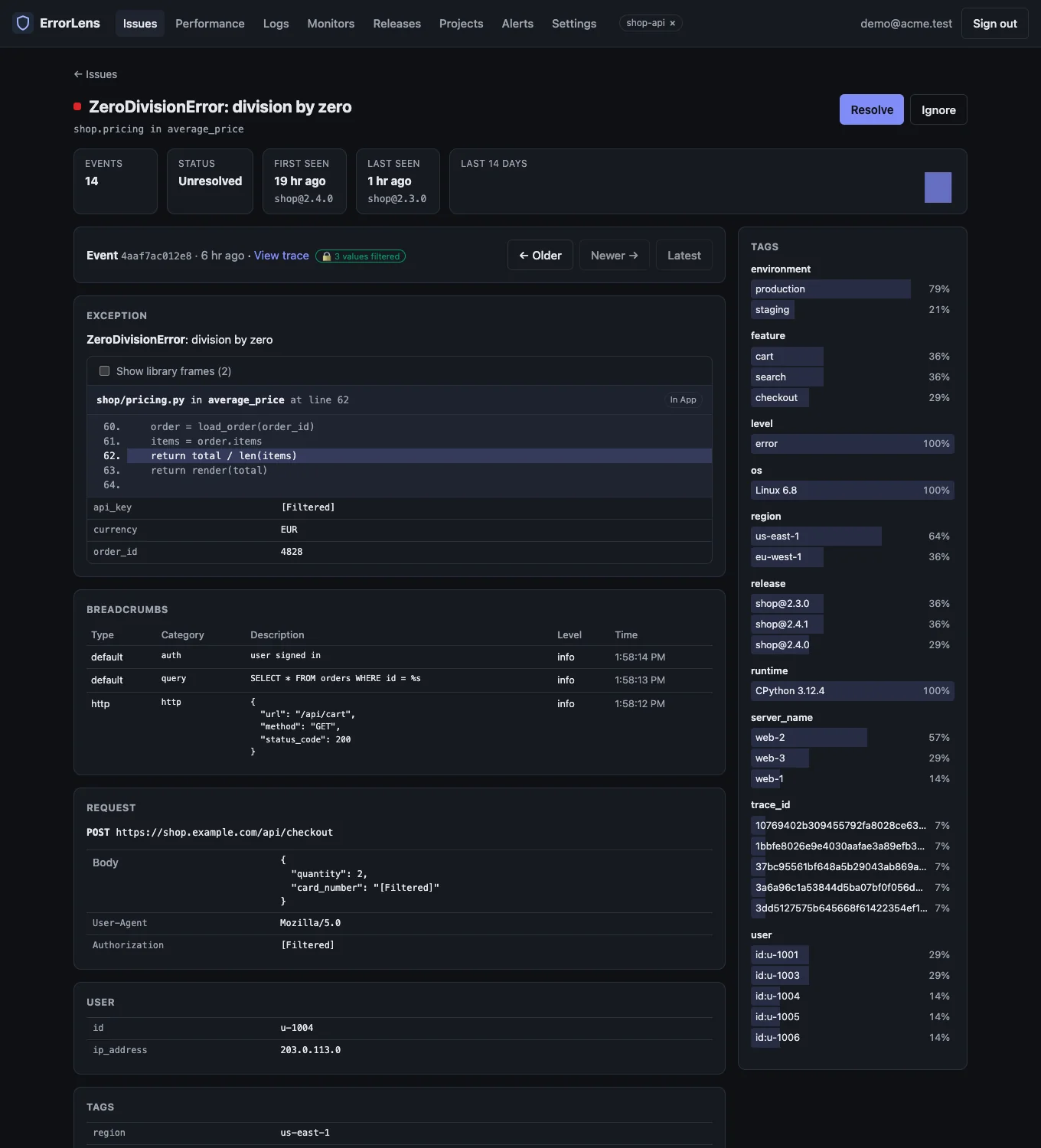
The top row shows the total number of events, the status, when it was first seen and last seen (with the release each happened in), and a bar chart of the last 14 days.
Events
An issue can have many events — one per occurrence. The event panel shows one at a time; use Older, Newer and Latest to move between them. Each event shows its ID and age, a View trace link when it was part of a trace, and a lock badge counting the values ErrorLens filtered out of it.
Opening an event is recorded in the organization's audit log.
Stack trace
The exception's type and message are followed by its stack trace, most recent call first:
- In App frames are your own code; library frames are hidden until you tick Show library frames.
- Frames from your code show the surrounding source lines, with the failing line highlighted.
- When the SDK captures them, local variables for the frame are listed below the code. Secrets in them appear as
[Filtered]. - For minified JavaScript, upload source maps to see original files and lines.
Chained exceptions ("during handling of the above exception…") are shown one after another.
Breadcrumbs
Breadcrumbs are the steps that led to the error: HTTP requests, database queries, log messages, clicks and navigation. Each has a type, category, description, level and time. SDKs record many automatically; add your own with add_breadcrumb / addBreadcrumb.
Request, user and context
- Request: the method and URL, and the headers and body the SDK captured — with authorization headers, cookies, card numbers and other secrets removed.
- User: the ID you set with
set_user, and the IP address, which is truncated by default. - Contexts: runtime, operating system, browser, device and anything you added with
set_context.
Tags
The right-hand column breaks the issue down by every tag: environment, release, server, operating system, runtime, user, region or any tag you set. Each bar shows the share of events with that value — a quick way to see that an error only happens on one release or in one region.
Resolve or ignore
Use Resolve and Ignore at the top right. See Triage and Regressions.