
Features
Issues and grouping
How ErrorLens groups errors into issues, how fingerprints work, and how to resolve, ignore, merge and search issues and track regressions.
Your apps may send thousands of error events, but most of them are the same few bugs. ErrorLens groups events with the same cause into an issue, so you see one row per problem, with how often it happens and when it started.
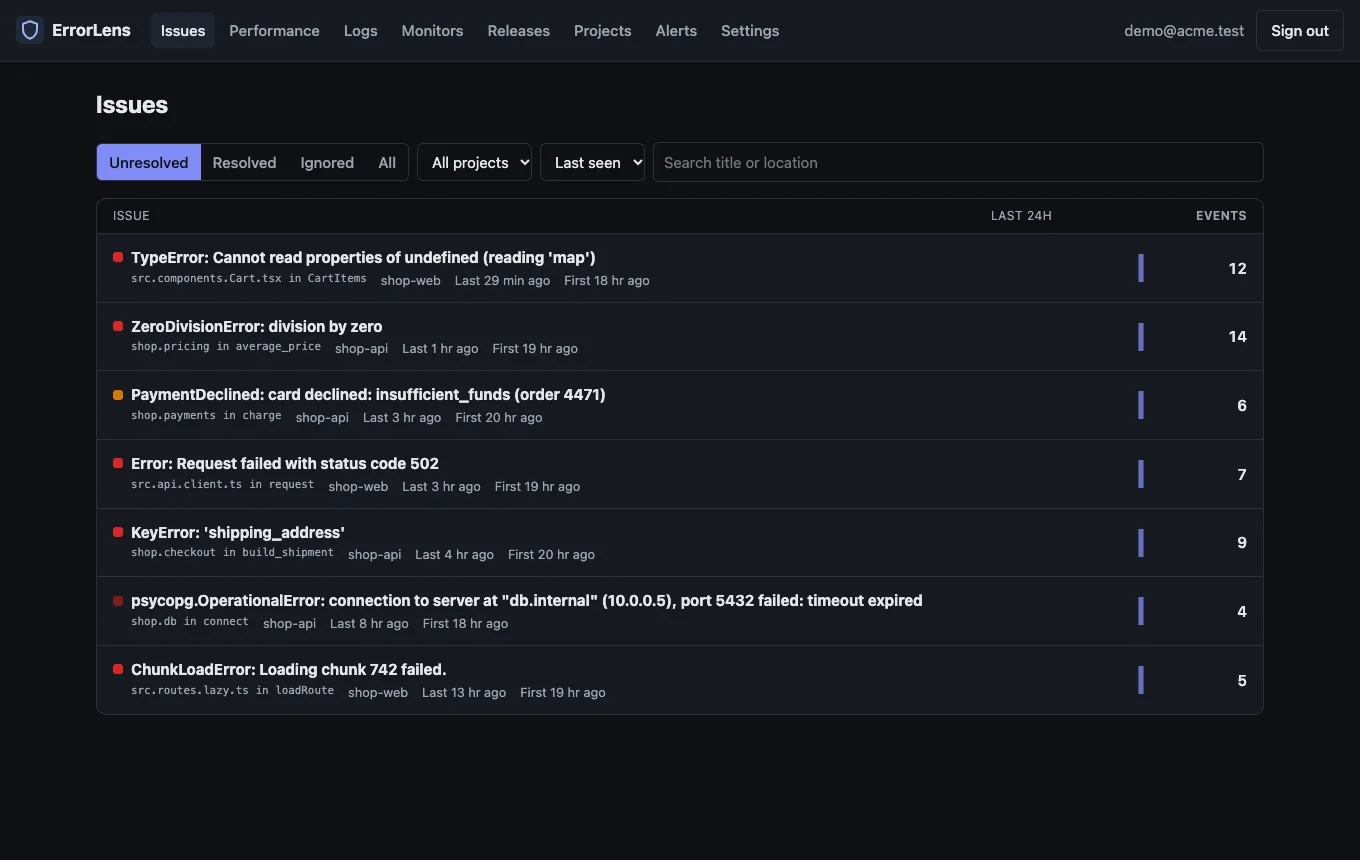
The issues list
Issues shows unresolved issues from all projects, newest activity first. Use the controls at the top to:
- switch between Unresolved, Resolved, Ignored and All
- filter by project — or open a project's own path, like
/checkout-api/issues - sort by Last seen, First seen or Events
- search the issue title and location (file and function)
Each row shows the error type and message, the culprit (the function where it was raised), the project, when it was last and first seen, a graph of the last 24 hours and the total number of events.
How events are grouped
When an event arrives, ErrorLens computes a fingerprint from it. Events with the same fingerprint belong to the same issue. In order of precedence:
- Your own fingerprint, if the SDK sends one (see below).
- The stack trace: the exception types plus the in-app frames — your code, not libraries — identified by module or file and function name. Line numbers are ignored, so an issue stays the same when you edit unrelated code.
- The exception type and message, when there is no stack trace.
- The message alone, for messages captured with
capture_message.
Variable parts of messages are normalized first, so Order 4471 not found and Order 9812 not found are one issue. Numbers, UUIDs, email addresses, IP addresses, timestamps and long hex strings are all replaced. Generated names — build hashes in file names like app.3f9a8b7c.js, memory addresses and anonymous-function numbers — are normalized in stack frames too.
Custom fingerprints
To split or merge issues yourself, set a fingerprint in the SDK. Use {{ default }} to extend the normal grouping rather than replace it:
with errorlens.new_scope() as scope:
    scope.fingerprint = ["{{ default }}", tenant_id]   # one issue per tenant
    errorlens.capture_exception(err)
ErrorLens.withScope((scope) => {
scope.setFingerprint(["payment-provider-timeout"]); // all of these in one issue
ErrorLens.captureException(err);
});Triage
Open an issue and use the buttons at the top right:
| Action | Effect |
|---|---|
| Resolve | You fixed it. It moves to Resolved. |
| Ignore | Not worth fixing. It moves to Ignored and stays there, even if new events arrive. |
| Unresolve / Stop ignoring | Move a resolved or ignored issue back to the unresolved list. |
Members, admins and owners can change an issue's status; viewers can only look.
Regressions
If a resolved issue receives a new event, ErrorLens reopens it automatically and marks it as a regression — the fix didn't hold, or the bug came back in a new release. Alert rules can notify you about regressions separately from brand-new issues.
Data retention
Events are kept for the project's retention period — 30 days unless changed under Settings → Projects. Issues whose events have all expired disappear from the list.